Insurance companies face a unique challenge: they must manage a huge number of policies, keep records accurate, and deliver fast service. For decades, this meant piles of paperwork and slow manual work. But today, insurance policy management software is changing how the industry works. This digital transformation is not just about using computers—it’s about gaining speed, flexibility, and control.
Modern policy management tools are more than simple databases. They help insurers issue new policies, renew contracts, process changes, and track claims—all in one place. They also make it easier for customers to buy, update, or cancel insurance. For growing companies, this software is a must-have to stay competitive.
But choosing the right system is not always simple. There are many options, each with strengths, weaknesses, and costs. Understanding what matters most, and how these systems work, is key to making a smart decision.
What Is Insurance Policy Management Software?
Insurance policy management software is a digital system used by insurers to handle the entire policy lifecycle. This includes creating new policies, storing customer data, updating policy details, managing renewals, and even handling cancellations. The software is designed to reduce errors, automate routine work, and keep everything organized.
For example, when a customer wants to buy car insurance, the software can collect their details, calculate their premium, issue the policy instantly, and store all documents securely. Later, if the customer wants to add a new car or change coverage, the system updates the policy and keeps records accurate.
Many solutions now include cloud-based features, which means employees can access information securely from anywhere—no need to be in the office. This is especially important as more companies offer remote work and digital services.
Key Features And Functions
The best policy management software has a set of core features that support every part of the insurance process. Here are the most important ones:
- Policy Creation and Issuance: Automates the process of creating, approving, and delivering new policies.
- Renewal Management: Tracks when policies are about to expire and can automatically send renewal notices.
- Endorsement Handling: Allows changes to policies, such as adding new coverage or updating personal details.
- Document Management: Stores all policy documents, customer forms, and communications in one secure place.
- Claims Integration: Connects policy data with the claims system for faster, more accurate service.
- Reporting and Analytics: Provides detailed reports on sales, renewals, cancellations, and more.
- Compliance Management: Keeps records to meet government regulations and audits.
- Customer Self-Service: Lets clients view policies, request changes, or pay premiums online.
Example: Real-world Policy Lifecycle
A typical customer journey shows how these features work together:
- Purchase: Customer applies for life insurance online. The software checks eligibility, calculates premium, and issues the policy within minutes.
- Update: Customer gets married and updates their beneficiary. The system logs the change and updates the contract.
- Renewal: One year later, the software sends a renewal notice. The customer pays online and the policy renews automatically.
- Claim: If a claim is filed, all policy details are immediately available to the claims team, speeding up processing.
Benefits For Insurers
Switching to digital policy management brings many advantages. Here are some of the biggest:
- Faster service: Policies can be issued or updated in minutes, not days.
- Lower costs: Automation reduces manual work and errors.
- Better customer experience: Clients can access their policies 24/7 and get help quickly.
- Scalability: As a company grows, the system can handle more policies without hiring more staff.
- Regulatory compliance: Built-in tools help meet legal requirements and avoid fines.
One non-obvious benefit is data-driven decision-making. With all policy data in one place, managers can spot trends, identify best-selling products, and respond quickly to market changes.
Another often-missed advantage is disaster recovery. Cloud-based systems keep data safe even if the office network fails, protecting both the company and its customers.
Common Challenges And How Software Solves Them
Insurance companies face several challenges that good policy management software can address:
Manual Errors And Data Silos
Paper-based systems or old databases make mistakes easy—misspelled names, lost forms, or missed renewals. Software keeps information consistent and reduces human error.
Regulatory Complexity
Insurance is highly regulated. Companies must keep detailed records and follow strict rules. Good software keeps audit trails, sends compliance alerts, and helps avoid costly mistakes.
Slow Product Launches
Launching a new insurance product can take months if everything is manual. Modern systems let companies build and test new products quickly, then roll them out to agents and customers with minimal delay.

Credit: velvetech.com
Types Of Insurance Policy Management Software
Not all systems are the same. Here’s a comparison of the main types:
| Type | Description | Best For |
|---|---|---|
| On-Premises | Installed on company servers, managed by in-house IT. | Large companies with strict data rules. |
| Cloud-Based | Accessed via the internet, managed by the provider. | Small to medium insurers, remote teams. |
| Hybrid | Mix of on-premises and cloud, for flexibility. | Companies needing both control and remote access. |
Most new solutions are cloud-based because they are easy to update, scale, and access from anywhere. However, large companies sometimes prefer on-premises systems for greater control.
Choosing The Right Software: What Matters Most
Buying insurance policy management software is a big decision. Here are the key factors to consider:
- Ease of Use: The system should be simple for staff and agents to learn.
- Integration: Can it connect with your CRM, accounting, or claims systems?
- Customization: Does it support your unique products, workflows, and branding?
- Security: Look for strong data protection, backups, and user controls.
- Regulatory Support: Does it help you stay compliant with local and international rules?
- Cost: Consider both upfront and long-term costs, including updates and support.
Comparison: Top Features To Evaluate
Here’s a quick feature comparison to guide your search:
| Feature | Essential | Nice to Have | Rare |
|---|---|---|---|
| Automated Renewals | ✔ | ||
| Custom Reports | ✔ | ||
| AI Underwriting | ✔ | ||
| Omnichannel Support | ✔ | ||
| Blockchain Record-Keeping | ✔ |
For most insurers, focus on automation, reporting, and compliance tools first. Advanced features like artificial intelligence or blockchain may be useful but are not essential for every business.
Leading Insurance Policy Management Software Providers
The insurance software market has many players, from global firms to smaller, specialized companies. Here are some well-known names:
- Guidewire: Popular with large insurers, offers a full suite of policy, billing, and claims management tools.
- Duck Creek Technologies: Known for flexible, cloud-based solutions.
- Sapiens: Supports many types of insurance, strong in analytics.
- Majesco: Focuses on digital transformation and rapid product launch.
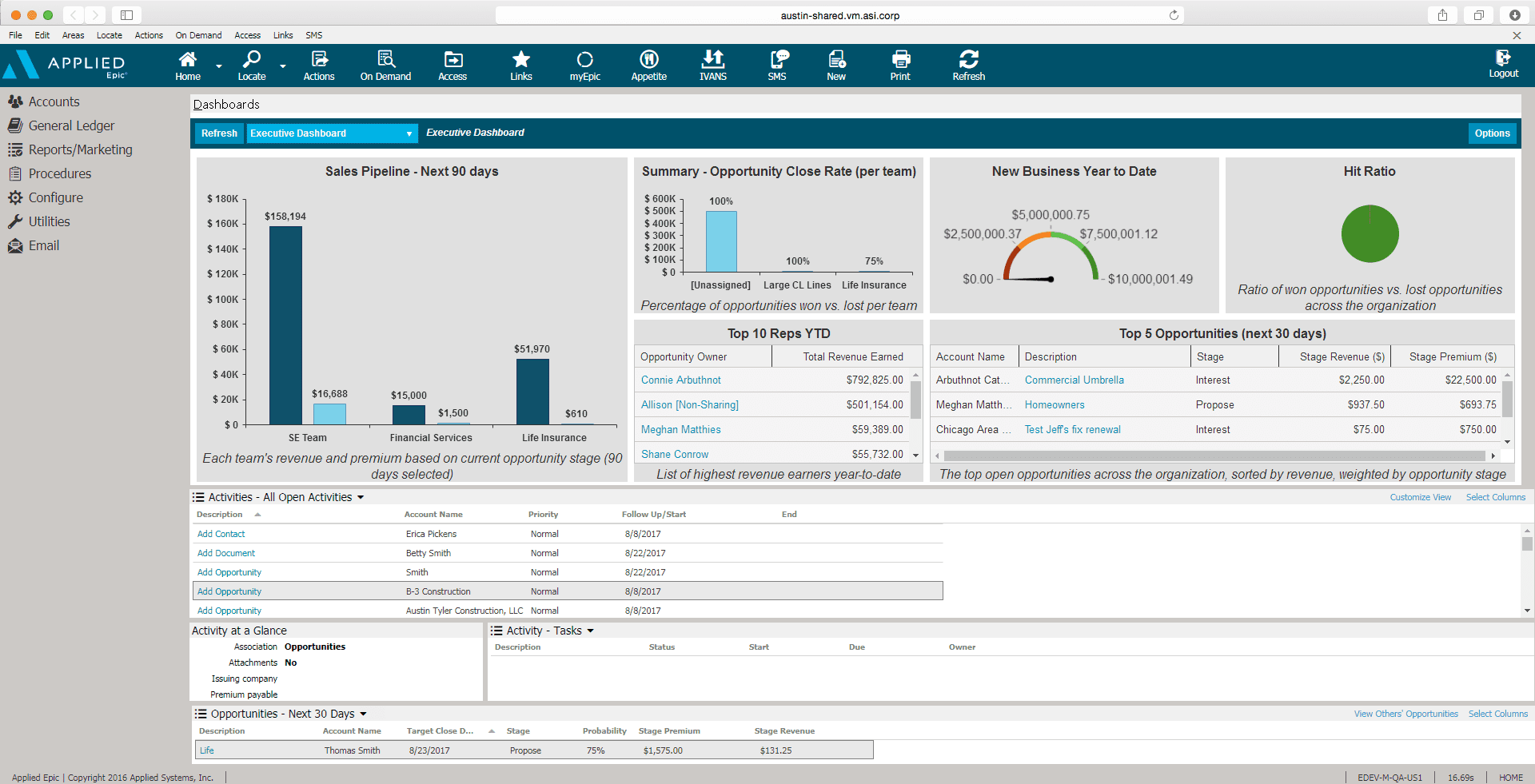
- Applied Systems: Widely used by insurance agencies and brokers.
Each provider has unique strengths. For example, Guidewire is famous for reliability and scale, while Duck Creek is loved for its easy upgrades and cloud-first design.
Implementation: What To Expect
Switching to a new policy management system is a major project. It requires planning, training, and sometimes changes in company processes. The typical steps are:
- Needs Analysis: Decide what you want to achieve and what features you need.
- Vendor Selection: Compare systems, ask for demos, and check references.
- Data Migration: Move your existing policy records into the new system.
- Configuration: Customize the software for your products and workflows.
- Training: Teach staff, agents, and sometimes customers how to use the new tools.
- Go Live: Start using the system for new and existing policies.
- Continuous Improvement: Collect feedback and make updates over time.
It’s common to hit challenges, such as data cleanup or staff resistance. Plan for extra time and involve both IT and business teams from the start.
.jpg)
Credit: www.britecore.com
Cost And Roi
Prices for insurance policy management software can vary widely. Cloud solutions often charge a monthly fee per user or per policy, while on-premises systems may require a large upfront investment.
A small insurer might pay $5,000–$20,000 a year for a basic system. Large companies may spend hundreds of thousands. Despite the cost, most companies see a return on investment (ROI) within 1–3 years. The biggest savings come from:
- Fewer manual errors and rework
- Faster policy processing and renewals
- Reduced paperwork and storage costs
- Improved customer retention
Surprisingly, a common mistake is focusing only on software price and ignoring the costs of training, change management, and ongoing support. Successful projects budget for the entire journey—not just the technology.
Future Trends In Policy Management Software
Insurance technology is evolving quickly. Some trends to watch:
- Artificial Intelligence: AI tools are helping automate underwriting and detect fraud.
- APIs and Ecosystems: Open APIs make it easy to connect policy software with other apps and services.
- Customer Self-Service: More systems let customers handle changes, renewals, or claims themselves.
- Data Security: With cyber threats rising, advanced encryption and user controls are now standard.
One innovation is usage-based insurance (UBI), where software tracks how much or how safely you drive, adjusting your premium automatically. This requires flexible, real-time policy management tools.
For more on technology trends, see this Wikipedia overview of insurance technology.
Credit: whatfix.com
Frequently Asked Questions
What Is Insurance Policy Management Software?
Insurance policy management software is a digital tool that helps insurers create, update, renew, and store policies. It automates many tasks and keeps records organized and secure.
How Does Policy Management Software Improve Customer Service?
It allows customers to access their policies online, make changes easily, and get quick answers. This reduces wait times and increases customer satisfaction.
Can Small Insurance Agencies Benefit From Policy Management Software?
Yes. Even small agencies can save time and reduce errors. Cloud-based systems are often affordable and easy to set up, making them a good choice for smaller teams.
How Long Does It Take To Implement A New Policy Management System?
Implementation can take from a few weeks to several months, depending on the size of the company, the amount of data, and the complexity of requirements.
What Should I Look For When Choosing Insurance Policy Management Software?
Focus on ease of use, strong integration options, good security, and support for your company’s unique needs. Always check for reliable customer support and vendor reputation.
Insurance companies that choose the right policy management software can transform their operations, reduce costs, and serve customers better. As the industry becomes more digital, these tools are no longer optional—they are essential for growth and long-term success.
Read More:
- Insurance Marketing Strategies 2026: Top Trends to Watch
- Best Insurance Affiliate Programs: Top Picks to Maximize Earnings
- Insurance Software for Agencies: Boost Efficiency and Growth
- Commercial General Liability Insurance: Protect Your Business Today
- Best Health Insurance for Freelancers: Top Plans Compared
- Liability Insurance for Contractors: Essential Protection Guide
- Affordable Burial Insurance Plans: Secure Peace of Mind Today
- Best Travel Medical Insurance Plans: Top Picks for 2024